

Aurelia js is a JavaScript client framework, open source and built on top of Virtual DOM data binding. This article proposes to introduce you with the most basics as follows: building your first Aurelia js project, how to get started with Aurelia, what is Aurelia framework good for, how do I update?
Why should I use Aurelia js?
There are many reasons to use Aurelia, but here are some of the most compelling:
-Aurelia js is built with modern standards like ECMAScript 2015, making it easy to write code that is cross-browser compatible and future-proof.
-Aurelia has a small footprint, so your application will load quickly and run smoothly.
-Aurelia's templating system is very powerful and flexible, allowing you to create rich user interfaces.

-You can choose from a wide variety of plugins and extensions to add features to your Aurelia project.
There are many reasons to use Aurelia, but some of the key benefits include:
-Aurelia is a JavaScript client framework that lets you build powerful applications using simple and concise code.
-Aurelia's convention over configuration approach makes it easy to get started without having to learn complex concepts.
-The Aurelia community is friendly and welcoming, and there is a wealth of resources available to help you get started and succeed with Aurelia.

Step-1: Setting up aurelia js environment
You need to have NodeJS installed in your Machine as Aurelia js uses NPM as Dependency Manager. NPM will be installed with NodeJS.
Assuming that you have Node.js installed, you need to install the Aurelia CLI via npm. This can be done by running the following command:
npm install aurelia-cli -gYou also need to install a few other node modules that are required for building and running your Aurelia project. These can be installed by running the following command:
npm install jspm Gulp -gWith the Aurelia CLI and required node modules installed, you can now create your first Aurelia project. This can be done by running the following command:
au new my-projectAssuming that you have node.js installed, you can install the aurelia-cli tool with npm by running the following command:
npm install -g aurelia-cliOnce you have installed the aurelia-cli tool, you can create a new aurelia project by running the following command:
`au new`
You will be presented with a list of options for your project. For this example, we will select the default ' Aurelia' option. This will create a folder structure and files for an empty Aurelia application. After answering some questions about your project, the CLI will install all required dependencies and libraries. Once it has finished installing everything, you can navigate into your newly created project folder and run it by executing the following command:
au run --watchStep-2: Code snippet for displaying a message in the browser
Assuming you have already installed the Aurelia CLI, created a new project, and are serving it via the CLI, the code snippet below will display 'Hello World!' in the browser.

Step-3: In the next step, we will go over how to display some content within an element.
In the next step, we will go over how to display some content within an element.
We will do this by using the aurelia js -binding and aurelia js- templating libraries. These libraries provide the ability to two-way bind to object properties, render HTML templates with dynamic data, and more.
Assuming that you have already set up your development environment, the next thing you need to do is create an HTML file and include the Aurelia bootstrapper.
Once you have done that, you can then start writing some code within your HTML file. In the next step, we will go over how to display some content within an element.
Step-4: Adding Code Snippet to Display Other Content on Your Browser
If you would like to display other content on your browser while using Aurelia, you can do so by adding a code snippet. To add a code snippet, first create a new file in your project's src directory.
The file name should end with .ts (for TypeScript) or .js (for JavaScript). In this file, you will add the following code:
import {PLATFORM} from 'aurelia-pal';

export function configure(aurelia) {

aurelia.globalResources([

PLATFORM.moduleName('./my-element')

]);

}
This code will import the my-element component and make it available globally within your application. You can then use this component in any of your HTML files like so:
Combining code snippets
If you're like most developers, you learn best by doing. So, in this section, we'll walk you through the process of building your first Aurelia project.
We'll start by combining some code snippets to get a basic 'Hello World' app up and running. Then we'll add a bit more functionality, step by step, until we have a fully-functional Aurelia app.
So let's get started!
When it comes to combining code snippets, there are a few things you need to keep in mind.
First and foremost, you need to make sure that the code snippets you're combining are compatible with each other.
Secondly, you need to make sure that the code snippets you're combining follow the proper syntax. Lastly, you need to make sure that the code snippets you're combining don't conflict with each other.
Assuming that you have two code snippets that are compatible with each other and follow the proper syntax, the process of combining them is relatively simple. Simply take the first snippet and place it above the second snippet.
Make sure to put a space between the two snippets so that they don't run into each other.
Once you have your two snippets combined, save your changes and run your project to see if everything works as expected. If everything looks good, then congratulations! You've successfully combined two code snippets together.
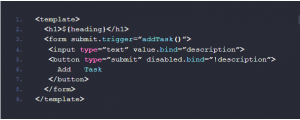
View file will look like
Databinding
Databinding is a must for any UI framework and Aurelia js really shines with its implementation.
Aurelia makes it easy to bind data to your UI. You can use two-way databinding, which will keep your UI and your data in sync, or you can use one-way databinding, where changes to your data are automatically reflected in your UI.
To use two-way databinding, you just need to add the aurelia-binding package to your project. Then, you can use the bindable decorator on any property in your view model:
typescript

export class MyViewModel {

@bindable myProperty;

constructor() {

this.myProperty = 'initial value';

}

}
we will try to show you How to use Custom Element (Components) , Aurelia Router, Event Aggregator in later posts.
